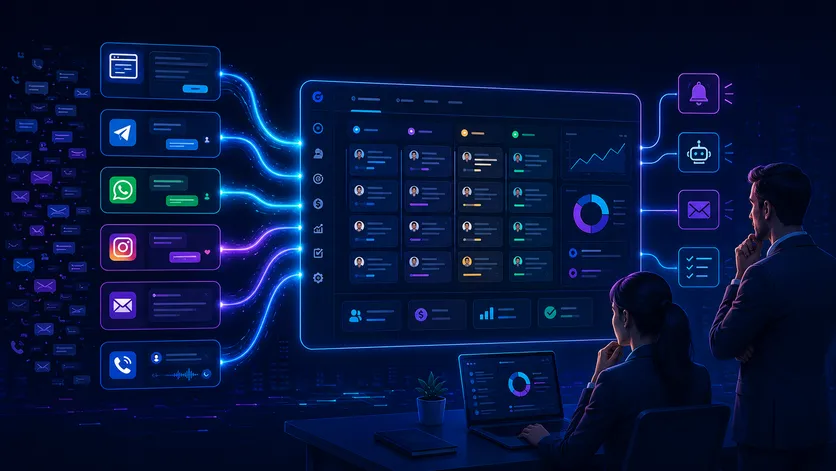
CRM integration with website and messengers is essential for businesses when leads arrive from various channels but are processed manually: someone copies a contact from a form, someone forwards a message from Telegram, while some inquiries stay lost in Instagram, WhatsApp, or ad comments.
At first glance, this looks like a minor operational inconvenience. In reality, this is where businesses often lose money: a manager misses a lead, fails to call back, forgets to set a reminder, doesn’t update the status, or fails to enter information into the CRM. We have already analyzed why business leads are lost; in this article, we will show a practical solution — how to gather all lead sources into a single system.
Proper integration is not just about a “send lead to CRM” button. It must answer three questions: where did the lead come from, who is responsible for it, and what happens next. If these three things are not configured, the CRM quickly turns into just another contact database that the team updates sporadically.
What Does CRM Integration with Website and Messengers Mean?
CRM integration with a website is the automatic transfer of data from forms, quizzes, callback widgets, chats, advertising campaigns, and other contact points into the CRM. A lead is created without manual copying, immediately receiving its source, contact details, client comment, assigned manager, and the correct status.
If you add messengers, the scheme expands: a business can collect inquiries from Telegram, WhatsApp, Viber, Instagram Direct, Facebook Messenger, or an online chat. Some channels are connected via ready-made CRM integrations, others — via API, webhooks, n8n, Make, Zapier, or dedicated connectors.
The CRM should be the central hub for the lead, not just another communication channel. A client might write from the website, Telegram, or WhatsApp, but for the team, it should all look the same: a new lead, a clear source, an assigned manager, a next action, and a contact history.
Which Lead Channels Should You Connect to Your CRM?
Before implementing, it’s important not to “connect everything” but to describe the actual lead sources. For small and medium businesses, the most common channels are:
- Website forms — contact forms, consultation forms, quote requests, quizzes;
- Callbacks and chats — website widgets that collect phone numbers or start a dialogue;
- Telegram — bots, direct messages, channels, or groups for inquiries;
- WhatsApp and Viber — popular channels for quick client contact;
- Instagram and Facebook — Direct, Messenger, lead forms, ad comments;
- Email — email inquiries, partner letters, newsletter responses;
- Telephony — calls, missed calls, call recordings, callback tasks;
- Marketplaces and catalogs — if the business sells products or services through external platforms.
At this stage, it’s useful to remember our guide to CRM for small businesses: the choice of CRM should depend not only on price or brand but also on which sales channels need to be connected from day one.
What a Proper Lead Collection Scheme Looks Like
The basic integration scheme is simple: a client leaves a request, the system accepts the data, the CRM creates a lead or a deal, the manager receives a task, and the executive sees the source and status. But it’s in the details that this scheme determines whether the process will work or not.
| Stage | What Should Happen | Why It’s Needed |
|---|---|---|
| Source | Form, messenger, ad, or call transfers data automatically | So the lead doesn’t depend on manual copying |
| CRM | A contact, lead, or deal is created with the required fields | So the manager sees the full client context |
| Responsible | The system assigns a manager or puts the lead in a queue | To avoid “I thought someone else was handling this” situations |
| Next Action | A task, reminder, or automatic follow-up is created | So the lead doesn’t stall without contact |
| Analytics | Channel, campaign, status, result, and reason for rejection are stored | So the executive sees which channels generate sales |
If even one stage is missing, the integration is incomplete. For example, a lead might enter the CRM but without UTM tags; a manager might see the contact but not receive a task; the executive might see the number of leads but not understand which channels actually drive payments.
What Data Should Be Passed to the CRM?
A typical mistake is passing only the name and phone number to the CRM. For a quick response, this is enough, but for proper sales and analytics, it is not. The lead should contain data that helps the manager understand the context without additional searching.
Minimum set of fields:
- client name or company name;
- phone, email, or messenger ID;
- lead source: website, Telegram, WhatsApp, Instagram, ads, referral;
- the website page or form from which the lead came;
- UTM tags of the advertising campaign;
- message text or selected answers in a quiz;
- city, service, budget, or other important parameters;
- date and time of lead creation;
- status and assigned manager.
For some businesses, it’s worth adding qualification fields immediately: client type, urgency, expected budget, product, priority level. If there are many leads, this data can be processed automatically via AI lead qualification, so the manager sees a short summary and priority instead of raw text.
Integration Options: Ready-made Connector, API, or Automation Platform
Technically, integration can be done in several ways. The best option depends on the CRM, channels, budget, launch speed, and whether custom logic is needed.
| Method | When to Use | Limitations |
|---|---|---|
| Ready-made CRM Integration | Need to quickly connect a site, form, or popular messenger | May lack flexibility for non-standard fields and conditions |
| Webhook | Need to receive events from forms, bots, or external services | Requires security, data format, and error checks |
| CRM API | Need precise logic: contacts, deals, tasks, duplicates, statuses | Requires a developer or integrator who understands the API |
| n8n / Make / Zapier | Need to quickly assemble several systems without full custom development | Crucial to handle errors, limits, and duplicates correctly |
| Custom Backend | Many channels, complex rules, high load, or own product | More expensive at start, requires support and documentation |
For many tasks, an automation platform is enough. For example, the Webhook node in n8n can receive data from external services and trigger a workflow; then the scenario checks fields, creates a contact in the CRM, assigns a task to the manager, and sends a message to Telegram.
If more flexibility is needed, it’s useful to compare tools in our article about n8n, Make, and Zapier pricing. Here, it’s important to calculate not only the tariff but also how much manual work remains after the launch.
Integrating a Website with CRM: What to Check Before Launch
The website is usually the main entry point for a lead. But the website often passes incomplete data to the CRM: missing the page, UTMs, inquiry topic, consent for data processing, or a proper notification to the manager.
Before launching the integration, check:
- are all website forms connected to the CRM, not just the main one;
- are UTM tags, page, form name, and source being passed;
- is there a consistent lead structure for different forms;
- is there protection against spam, test leads, and bots;
- are duplicates prevented when a client reaches out again;
- does the manager receive a task or notification, not just a “new contact”;
- can you track which campaign the lead came from and how it ended.
For analytics, it’s useful to pass important events not only to the CRM but also to Google Analytics. The Google Analytics Measurement Protocol allows sending server-to-server events, including offline interactions, but it should be used as a supplement to on-site tags, not as a replacement for basic data collection.
Messenger Integration: Telegram, WhatsApp, Viber, Instagram
Messengers are more complex than websites because some communication happens in a dialogue. A client might write “interested in price,” send a voice message, attach a file, or ask for clarification a few hours later. If all this remains only on the manager’s phone, the business does not control the process.
For Telegram, bots and webhooks are often used. In the official Telegram Bot API documentation, the setWebhook method is described, which allows transferring bot updates to the required HTTPS endpoint. Then this data can be processed in an automation scenario or backend service.
For WhatsApp, look towards the official WhatsApp Business Platform. Meta’s documentation has a section on webhooks in the WhatsApp Cloud API, through which a business can receive events and messages. But this channel should be planned carefully: business settings, permissions, message templates, and an understanding of platform rules are required.
Instagram and Facebook Messenger are also best connected via official mechanisms or verified providers. Meta has separate documentation for Messenger Platform webhooks, but in a real project, it’s important not only to “receive a message” but also to correctly link it to a contact, a deal, and the client’s history.
If you need a specific scenario for Telegram, check out our article on CRM integration with Telegram. The current topic is broader: it’s about not splitting leads into “website,” “messenger,” and “ad,” but managing them in one process.
How to Avoid Creating Chaos in the CRM After Integration
Bad integration can accelerate chaos rather than remove it. If all channels start creating leads without rules, the CRM will be filled with duplicates, incorrect statuses, empty cards, dozens of test leads, and managers who don’t know what to do first.
To avoid this, define the rules before launch:
- Deduplication. What happens if the client is already in the CRM: create a new deal, update the contact, or add a comment?
- Distribution. How to assign the responsible person: in turn, by direction, by language, by region, or manually?
- Statuses. What status does a new lead receive and when does it change?
- SLA. Within how many minutes must the manager respond, and what happens if they don’t?
- Errors. Where do leads go if they couldn’t be transferred to the CRM?
- Logs. Where can you see that the integration worked or broke?
This is no longer just a technical connection, but CRM automation: the system not only receives data but supports the sales process, controls next actions, and gives the executive a transparent picture.
Step-by-Step Implementation Plan
To prevent CRM integration from becoming a chaotic project, it’s better to launch it in stages.
1. Describe All Lead Sources
Make a list of channels: website, forms, Telegram, WhatsApp, Instagram, Facebook, email, calls, marketplaces, Google Ads, Meta Ads. For each channel, write down who currently processes it and where leads are most often lost.
2. Define a Single Lead Structure
The CRM must have one logic for fields: contact, source, service, comment, status, responsible, priority, date of next action. If each channel passes data differently, analytics will quickly become inaccurate.
3. Start with the Most Valuable Channel
You don’t have to connect everything in one day. Often it’s better to start with the website and the main messenger, where most leads are lost or the warmest clients arrive.
4. Set Up Tasks and Notifications
A lead in a CRM without a next action is a half-finished integration. The manager must receive a task, a notification, or an automatic follow-up, and the executive must see overdue inquiries.
5. Add Analytics and Error Control
After launch, you need to see not only the number of leads but also conversions by channel, first response speed, reasons for rejection, duplicates, and transfer errors. Without this, the integration seems to work, but its quality is hard to evaluate.
What Can Be Automated After Lead Collection
Once all leads are in one place, the next level of automation opens up:
- automatic manager assignment;
- reminders for first contact and follow-ups;
- AI-summaries of messenger dialogues;
- prioritization of hot leads;
- automatic response to the client after the form;
- transfer of data to Google Sheets or a dashboard;
- daily reports to the executive in Telegram;
- passing offline conversions to advertising analytics.
At this stage, integration becomes part of sales, not just a technical bridge between services. This is how proper sales department automation works: managers spend less time on manual data transfer and more time working with clients.
Typical Mistakes in CRM Integration with Lead Channels
Connecting a Form but Not Passing the Source
If the CRM receives only the name and phone number, the executive cannot see which ad or website page brought the client. As a result, it’s difficult to evaluate marketing effectiveness.
Leaving Messengers on Managers’ Phones
When dialogues stay in personal accounts or phones, the business loses communication history. If a manager gets sick, quits, or forgets to respond, the executive finds out about the problem too late.
Ignoring Duplicates
One client might write from the website, then on Telegram, and then call. If the system creates three different contacts, managers see fragments instead of a full history.
Not Testing for Errors
Integration must work not only in the ideal scenario. You need to check what happens if the CRM is unavailable, the form passed incomplete data, a webhook returned an error, or a manager didn’t take the lead.
When a Business Definitely Needs This Integration
CRM integration with a website and messengers is not needed by everyone at the first stage. If there are few leads and one person handles them, a simpler scheme is fine. But there are signals after which delaying it is expensive:
- leads arrive from three or more channels;
- managers manually transfer contacts to the CRM;
- some inquiries remain in messengers;
- there is no exact understanding of which source gives sales;
- the executive doesn’t see overdue leads;
- clients repeatedly write “you still haven’t answered me”;
- the team is growing, but the lead processing process depends on people’s memory.
If you recognize even a few points, integration is no longer an “improvement for later” but a way to regain control over sales.
FAQ: Briefly About CRM Integration with Website and Messengers
Can I integrate a CRM with a website without a programmer?
Yes, if the CRM, website form, or builder has a ready-made integration. But if you need UTM tags, complex fields, duplicate checks, multiple messengers, and custom rules, it’s better to involve an integrator or developer.
What’s better: a ready-made integration or n8n?
Ready-made integration is suitable for simple scenarios. n8n is better when you need to combine several systems, add conditions, error handling, data verification, notifications, and custom logic.
Do I need to connect all messengers at once?
No. It’s better to start with the channels that actually generate leads. If 80% of inquiries come from the website and Telegram, first set those up qualitatively, and then add other sources.
How do I know if the integration is working correctly?
Check a simple scenario: a client leaves an inquiry, it appears in the CRM with the correct source, the manager receives a task, the executive sees the status, and the result can be tracked in analytics. If any step is missing, the integration needs work.
📌 CRM integration with website and messengers should collect not just contacts, but the full lead route. It is vital for a business to see the source, the responsible person, the status, the next action, and the result. Then the CRM becomes a sales center, not a contact archive that managers fill manually.